AI Humanizer for Business Emails & Professional Writing
Refine AI-drafted reports, proposals, and communications into writing that sounds like a senior colleague wrote it, with your company's terminology locked in place.
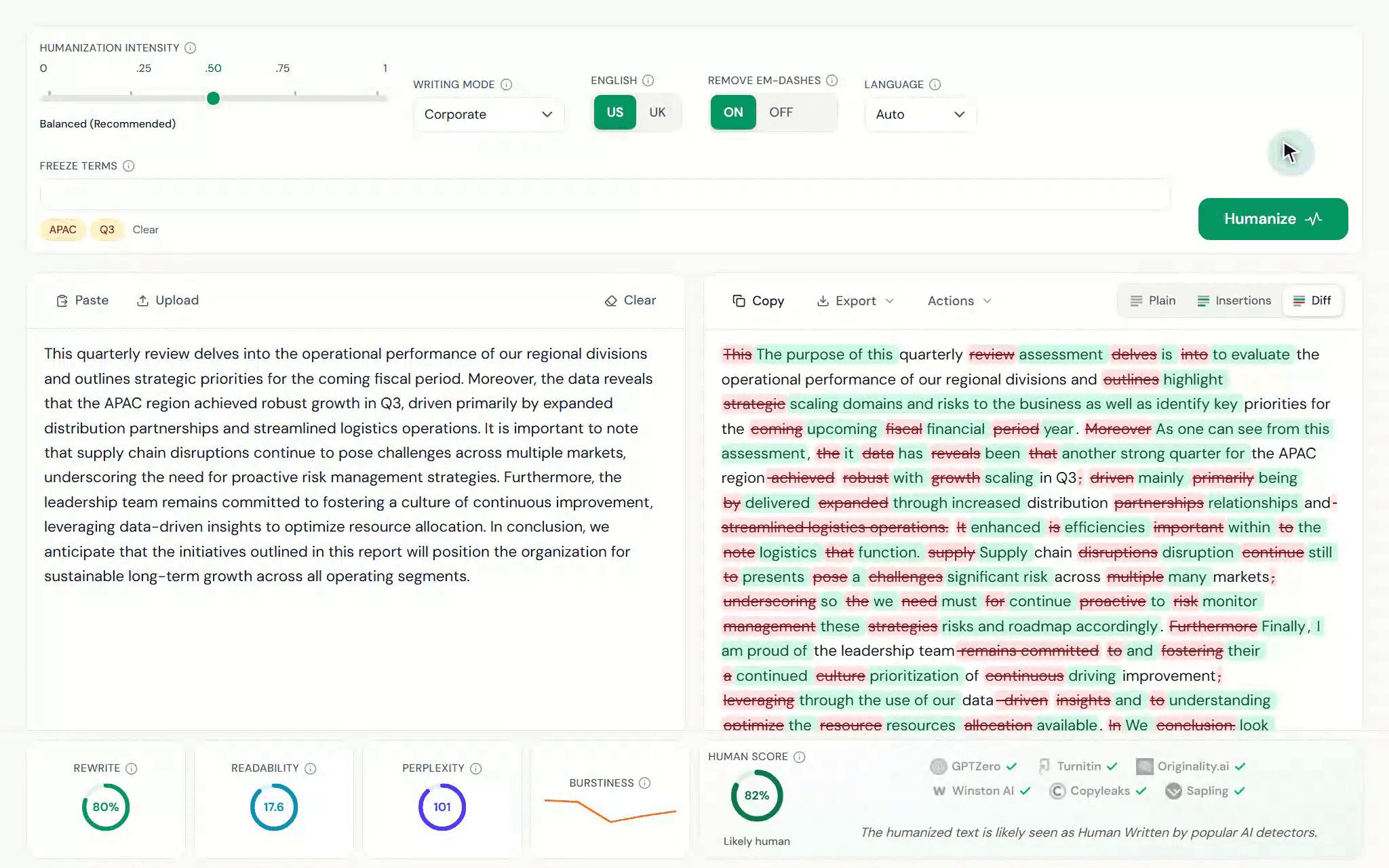
A real humanization of an AI-drafted quarterly memo: Corporate mode with key business terms frozen, every edit visible in the diff, and the full metrics report below.
ULTRANEW!
ULTRA: The Maximum Rewrite for Reports and Proposals
Set the slider to ULTRA when a report or a proposal needs the max AI score reduction. Product names, figures and contract terms are preserved verbatim with freeze terms.
AI score reduction vs. Semantic Faithfulness vs. grammar
AI score reduction (GPTZero, %)
Semantic Faithfulness (NLI support × 100)
Grammar (LanguageTool flags per 1,000 words)
From Mild to Ultra, the AI score reduction increases from 50% to 89%. AI score reduction increases at the cost of a slightly lower semantic faithfulness, grammar, and overall readability.
The sixth setting on the slider
ULTRA is the highest of the six intensity settings, above Aggressive. It is the maximum rewrite, and it uses its own state-of-the-art fine-tuned model.
The highest AI score reduction rate
On GPTZero the AI score reduction rate rises from 50% at Mild to 78% at Aggressive and 89% at ULTRA.
Citations and figures preserved verbatim
Key terms, citations, numbers and your freeze terms are preserved verbatim at ULTRA, as at every other intensity.
Revise before you submit
ULTRA prioritizes the highest AI score reduction rate possible, at the cost of slightly lower readability & grammar. Revise output before submission.
ULTRA comes with the Plus plan and also works in the humanizer dashboard and in the Doc Humanizer. It works on English text only.
Upload the .docx of a report, a proposal or a white paper, up to 15,000 words, and download it humanized as a clean file or with tracked changes for review, with the headings, tables, figures and appendices preserved verbatim.
One upload of up to 15,000 words
Upload the .docx and the Document Humanizer works through every body paragraph in order, section by section, until the whole document is done. Built for the one-off humanization of a complete file.
Formatting and structure preserved
Headings, lists, tables, captions, equations, footnotes and the reference list are preserved verbatim. Inline citations, hyperlinks and the formatting of the surrounding text stay in place inside the humanized paragraphs.
Clean copy or tracked changes
Download a clean Word file that is ready to submit, or a Word file with every change tracked, so you or your supervisor can accept and reject the edits in Word. A plain-text file is included as well.
Progress window and an email when it is ready
A small window shows how far the humanization has got. Keep working or leave the page, and you get an email when the document is complete and ready to download.
The Document Humanizer comes with the Plus plan. It draws on the same word credit allowance as the AI Humanizer, the cost is shown before you start, and finished documents stay available for download for 30 days.
AI text humanization built for business emails and professional writing
Professional register by default
Rewrites keep the formal, confident tone business documents need, without the robotic cadence AI drafts carry into client-facing work.
Company terms stay fixed
Freeze product names, legal phrases, and internal terminology so nothing critical gets reworded on the way to a client, a partner, or a regulator.
Review-friendly output
Tracked changes show exactly what the humanizer edited before anything goes to a client or a board, and the Word export drops into your existing review chain.
Reads human to clients, partners, and screening tools
Professional documents move fast. A full humanization takes under a minute and adds no process.
01
Paste the AI draft
Drop the report, proposal, or email into the humanizer, or upload it as a .docx or .txt file. Short texts and full sections both work, up to the per-humanization word cap.
02
Pick a business register
Choose a business-appropriate writing mode, set the intensity, and freeze the product names and legal wording that must never change.
03
Review the audit trail, send
Every edit shows as an insertion or deletion, so you approve exactly what the client reads. Copy the result or export tracked changes to Word.
How TextPulse humanizes business writing
Professional documents move fast. TextPulse keeps the polish without adding process.
Paste, humanize, ship
One workspace: paste or upload the AI draft, pick a business writing mode and intensity, and get grammatically sound output that holds a professional register throughout.
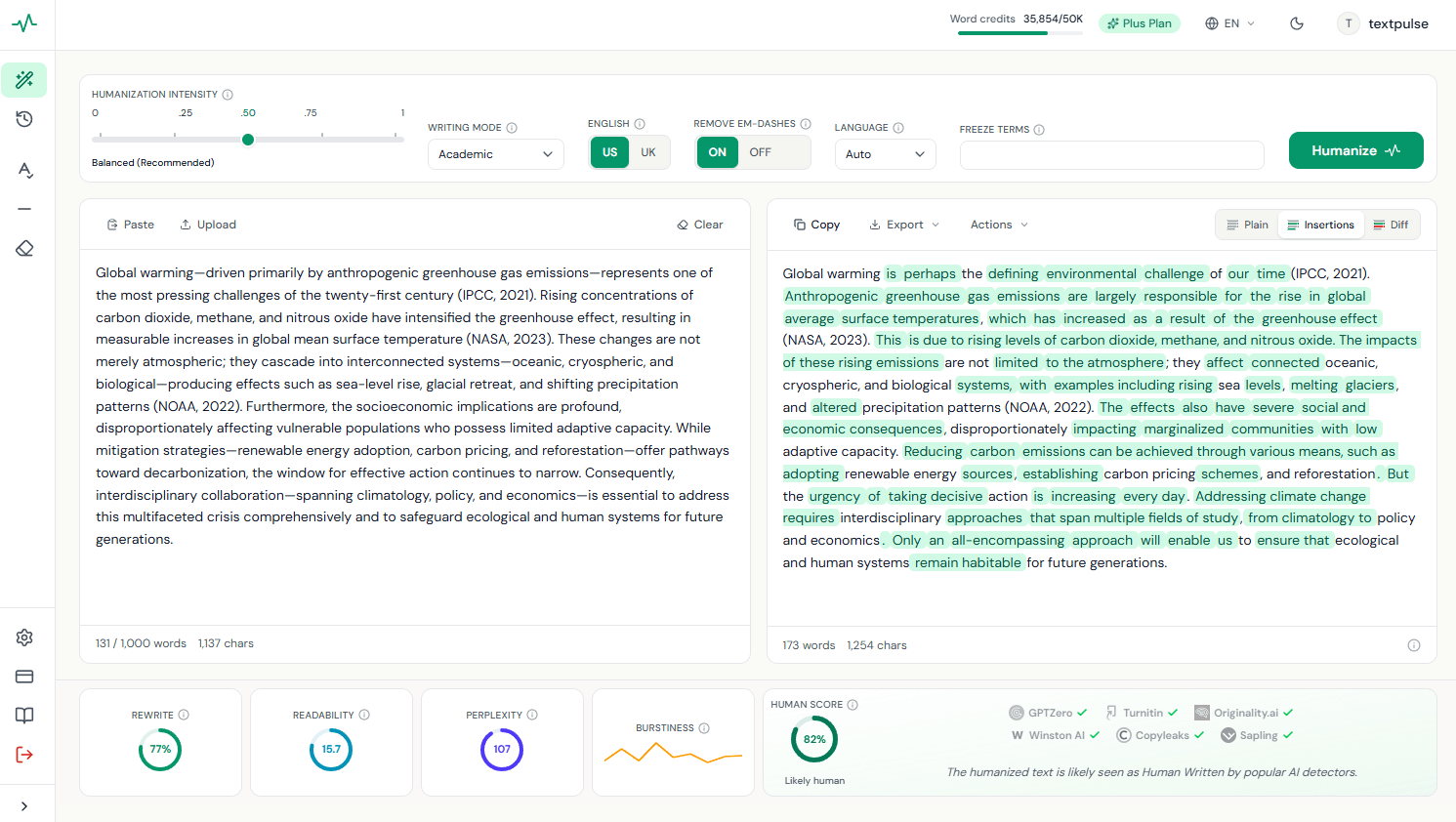
The metrics bar under the output shows the Human Score, readability, and how much of the draft changed, a quick quality gate before a document carries your signature.
Company terminology stays fixed
Freeze product names, legal wording, and internal vocabulary before each humanization. Frozen terms are preserved verbatim in the rewrite and come back highlighted, exactly as in the demo below, so nothing critical drifts on the way to a client.
The engine also preserves names, dates, and figures automatically, so the numbers in a quarterly summary stay the numbers your finance team signed off.
Freeze terms
Add terms to preserve verbatim...
Recent:+ Meridian CRM+ master services agreement+ total cost of ownership
Humanized
Our recommendation is to consolidate the regional teams onto Meridian CRM in the first quarter, before the renewal window opens. The current master services agreement allows a phased migration at no additional licensing cost, and the projected total cost of ownership falls by roughly a fifth once the legacy tooling is retired. We propose a six-week pilot with the northeast team to validate the migration plan.
An audit trail for every rewrite
The tracked-changes view shows exactly what the humanizer edited, so nothing unexpected reaches a client-facing document or a board deck. Flip the example below through the Plain, Insertions, and Diff views.
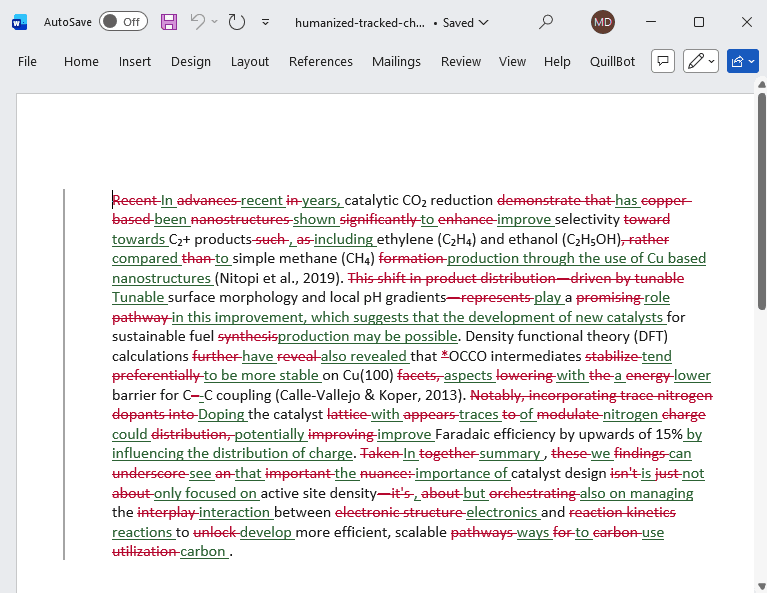
On the Plus plan the diff exports as a Word file with native tracked changes, ready for the same review chain your team already runs.
Humanized output
In the realmfield of natural language processing, this studyworkdelves intoinvestigates transformer architectures through the lens ofusing semantic understanding — underscoring. This highlights a pivotalmajor shift in how machines interpret human language.the manner in which human language is interpreted by machines.
ChatGPT, Claude or Gemini draft in. Professional writing out.
TextPulse humanizes documents drafted with ChatGPT, Claude, Gemini, Perplexity, Grok, Llama and every major model family, removing the machine cadence that screening tools and careful readers flag in business writing.
Straight to the detector
Drafts from ChatGPT, Claude, Gemini, and other models submitted as-is.
Flagged as AI
Through TextPulse first
The same drafts humanized before they meet the detector.
Reads Human
The Business AI Humanizer that Truly Preserves a Professional's Voice
Other humanizers change perspective. A first-person proposal turns impersonal, or a formal report is changed to the second person. TextPulse filters the output to the exact voice you chose, so the tone you wrote in is preserved in the humanization.
Formal academic
The neutral, objective tone of published research. No first or second person is seen in the output.
First person only
'I' and 'we' are preserved. Second person is blocked.
Second person only
'You' is preserved. First person is blocked.
Match my draft
The voice your original text already uses, kept exactly as written.
A common flaw in other humanizers is that they alter your neutral research tone into first or second person. We fixed that. Write the draft in the voice you need, and the TextPulse humanizer engine preserves it.
AI drafting saves hours; sounding like AI costs deals. Humanizing keeps the speed and restores the credibility.
Executive-ready tone by default
Business writing has its own register: direct, confident, and free of both academic stiffness and chatbot cheerfulness. The Corporate writing mode holds that register through every rephrase, so an AI-drafted proposal comes out sounding like your strongest writer.
Credibility with clients who screen
Procurement teams, agencies, and clients increasingly run submissions through AI detectors before signing off. Humanized output scores low on the major detection tools, so the work you delivered fast reads as your own.
Terminology governance built in
Product names, legal disclaimers, and compliance-approved phrasing are exactly the words a rewrite must never touch. Freeze them once and they are preserved verbatim in every humanization, highlighted in the output so review can confirm at a glance.
No training, no process overhead
There is nothing to configure and nothing to learn: paste, pick a mode, review the tracked changes, send. Most professionals are productive in their first session, and the audit trail means the review step your team already does covers the humanization too.
What professionals humanize with TextPulse
The documents where sounding human is part of sounding credible.
Business reports
Quarterly summaries and analyses read like a senior analyst wrote them while every figure stays exactly as reported.
AI humanizer for proposals and pitches
Proposals win on trust. Humanized drafts sound considered and specific instead of assembled by the same model your competitors use.
Executive summaries
The one page everyone actually reads comes out crisp, confident, and free of the filler AI drafts lean on.
AI humanizer for cover letters and resumes
Applications have to sound like a person. Humanize AI-polished cover letters and CVs so they read as your own writing.
Whitepapers
Long-form thought leadership holds a professional register across every section, with terminology frozen throughout.
Humanize AI emails and client replies
High-stakes emails humanize in seconds, so the follow-up that closes the deal sounds like you wrote it personally.
Export Tracked Changes to Microsoft Word
An audit trail your review chain already understands. The word-level diff exports as a .docx file with native tracked changes: open the report or proposal in Microsoft Word, walk stakeholders through exactly what changed, and accept or reject each edit before the document carries your signature.
0+
International Researchers
0+
Universities
0+
Languages
0%
Avg. AI Score Reduction
Trusted by 84,000+ researchers
Academics from 200+ universities rely on TextPulse for publication-ready humanization.
4.9from 6,200+ reviews
“As a non native English speaker I rely on AI to help draft my papers. This app preserves all technical terms while making the writing sounds natural for the same.”
PS
Dr. Priya S.
Indian Institute of Science
“I tried three other humanizers before TextPulse. They all corrputed my methodology section and removed terms for nonsense. This one kept everything in order. Recommended.”
MD
Marcus D.
NYU
“Review per their request. The freeze terms feature was the best part for me. I locked all my chemistry nomenclature and this tool has worked around them without even touching them. Five stars for that.”
SM
Sophie M.
LMU Munich
“I use text pulse for my several papers. It is fantastic and I will recommend.”
WC
Dr. Wei C.
Tsinghua University
“My thesis advisor runs drafts with Turnitin detector before accepting them. Since switching to this humanizer, my scores dropped drastically and it was a lifesaver honestly. And the writing is actually good without any major errors. Thank you TP Team!”
AO
Aisha O.
University of Toronto
“Other tools did not work and produced garbage but TextPulse Ai is doing well so far!!”
JH
James H.
Durham University
“Good job. The humanizer tool is useful. I can see what changed and refine what I need.”
PJ
Park J.
Seoul National University
“I used it for my IEEE journal paper for submission and am happy with all the results”
ER
Elena R.
Sapienza University of Rome
“I recommended TP humaniser to all my grad students and would also recommend for any researcher working on ongoing publications.”
DO
David O.
University of Edinburgh
“I used the Arabic humanizer for some articles and the result is professonal so thanks to you all”
FA
Fatima A.
King Saud University
“excellent and top demais!!! <3”
TS
Tomás S.
University of São Paulo
“I been using it frequently these last few weeks and I am very happy with all the results by textpulse.”
NM
Nguyen M.
Vietnam National University
“After humanizign my paper with this online platform I can reliably and confidently say that I recommend it for other stuidents”
LM
Lukas M.
ETH Zurich
“The Spanish humanizer worked well for me”
MG
María L.
University of Barcelona
“I did and completed a large amount of work using this humanisation tool for assignments.. the help was extensive and I appreciate this..”
TY
Tanaka Y.
University of Tokyo
“Needed a solution for Ai score reductions so I have used this app. I highly recommend it for researchers.”
NA
Nurul A.
University of Malaya
“Excellent job! I saved me a ton of effort to rewrite my artilce so I must say it is an excellent software with FIVE STARS!”
RP
Rizky P.
Universitas Gadjah Mada
“I process entire chapters at once, 8,000+ words, and TextPulse handled it even without removing a single reference or stat. Highly recommended from my personal experience.”
LW
Lim T.
National University of Singapore
“Most important thing for me is the citations since I use number format and when I tried 2 other ai tools they would always remove them.. I just needed one tool that would keep those citation IEEE style and I finally found it here. So thank you again and I will surely use again in the upcoming paper.”
ZH
Zainab H.
Quaid-i-Azam University
“it waş good for me but i just hasd an issue with the payment and the tech team replied and assist very fast and solve the problem in the same day..”
EY
Emre Y.
Boğaziçi University
“Excellent and highly recommended for the advanced humanising platform”
DV
Dmitry V.
RTU MIREA
Trusted by academics at leading universities
Massachusetts Institute of Technology
University of Oxford
LMU Munich
Sorbonne University
ETH Zurich
Utrecht University
Karolinska Institutet
University of Barcelona
Sapienza University of Rome
Lomonosov Moscow State University
Koç University
University of Tehran
King Abdulaziz University
Cairo University
University of Ibadan
Quaid-i-Azam University
Indian Institute of Science
Tsinghua University
Seoul National University
University of Tokyo
Chulalongkorn University
Vietnam National University
Universitas Indonesia
National University of Singapore
University of São Paulo
Massachusetts Institute of Technology
University of Oxford
LMU Munich
Sorbonne University
ETH Zurich
Utrecht University
Karolinska Institutet
University of Barcelona
Sapienza University of Rome
Lomonosov Moscow State University
Koç University
University of Tehran
King Abdulaziz University
Cairo University
University of Ibadan
Quaid-i-Azam University
Indian Institute of Science
Tsinghua University
Seoul National University
University of Tokyo
Chulalongkorn University
Vietnam National University
Universitas Indonesia
National University of Singapore
University of São Paulo
The research behind the business humanizer
Three published studies on machine-written text: how 11 humanizers compare on detector scores and meaning preservation, how far the major AI detectors agree with each other, and which writing signals mark a document as machine-generated. Corpus, scores and code are published with each one.
Eleven AI humanizers, 48 academic texts, 432 outputs scored on detection, meaning, terminology and citation retention. TextPulse leads in detector low-score rate while preserving semantic faithfulness, key terms, and citations.
The best AI humanizer for business writing: how TextPulse compares
Most AI humanizers drift the register and reword the terms that must not change. TextPulse holds a professional tone, freezes product names and legal wording, and leaves an audit trail of every edit.
Annual plans save 26%. Cancel anytime with no commitment. Compare all plans
One-time credit packs
For Pro and Plus subscribers. Buy once, use anytime, and credits never expire. Packs stack on top of your monthly allowance.
Starter Pack
$9one-time
10,000 words
Single essay or assignment
Research Pack
$19one-time
25,000 words
Research papers and reports
Thesis Pack
$29one-time
45,000 words
Dissertations and theses
Credit packs work alongside subscriptions. Buy extra words when you need them.
AI humanizer API for document pipelines
Humanize AI-drafted emails, reports and proposals inside your own tools with a single REST call. JSON goes in, professional prose comes back with your terminology intact, across more than 60 languages.
curlhttps://textpulse.ai/api/v1/humanize\-H"Authorization: Bearer tp_live_YOUR_KEY"\-H"Content-Type: application/json"\-d'{"text": "Our analysis indicates the intervention produced gains...","writingMode": "Academic","intensityScalar": 0.5}'
200 OKapplication/json
{"outputText": "Our analysis points to measurable gains from the...","metrics": {"inputWords": 128,"outputWords": 134,"wordsCharged": 128,"balanceRemaining": 99872,"modelLatencyMs": 4310,"route": "v1/humanize"}}
The 2024 Work Trend Index from Microsoft and LinkedIn, surveying 31,000 people across 31 countries, found that 75% of knowledge workers use generative AI at work, and 78% of them bring their own tools without waiting for company-approved ones. Microsoft published the report. AI-assisted business writing is no longer an edge behavior; it is how proposals, reports and client communication get drafted.
The cost is that everyone's documents have started sounding like the same model. When a proposal reads like raw AI output, it reads interchangeable, and clients notice. TextPulse's Corporate mode rewrites drafts into a confident professional register with the rhythm of an individual writer, while figures, product names and legal phrasing are preserved exactly as written.
Generative AI at work. Microsoft and LinkedIn 2024 Work Trend Index, 31,000 workers across 31 countries.
AI humanizer for business writing: frequently asked questions
Yes. Add them as freeze terms and they are preserved unchanged in every rewrite, however deep the humanization goes.
Yes. Registering gives you a free humanization demo with the tracked-changes view and the metrics bar, and no credit card. Humanizing your own emails, reports and proposals is on the Pro and Plus plans.
The Corporate mode, included with the Plus plan, holds a professional business register. The Pro plan ships the Academic mode, which also suits formal reports and analyses.
Yes. Anything from a three-line email to a full report section humanizes in one humanization, up to 500 words on Pro and 1,000 on Plus.
Yes. The tracked-changes view shows every insertion and deletion, and the Plus plan exports the diff to Word with native tracked changes for external review.
TextPulse. Job titles, company names, dates and figures are preserved verbatim, the Corporate mode holds a professional register, and the tracked-changes view shows every edit before you send. The published comparison of 11 humanizers is on the research page.