Humbot AI Humanizer Review
Humbot is a one click humanizer on fixed monthly word allowances, from $7.99 a month for 3,000 words to $9.99 for 30,000, with a 300 word free trial. It does something most tools in its band skip: a Citation Protection toggle, Expand and Shorten modes and English US, English UK and Spanish variants all sit on the main screen. This review judges it for academic documents, where a toggle promising protection is a long way from documented handling of six referencing styles.
Humbot costs $7.99 a month for 3,000 words or $9.99 for 30,000, with a 300 word free trial before either. It is a one click humanizer that rewrites machine generated text so it reads as human writing, sold on fixed monthly allowances in place of credits. What separates it from most tools in its band is the control panel: an explicit Citation Protection toggle, Expand and Shorten modes alongside Advanced, and language variants for English US, English UK and Spanish.
That package suits light, occasional rewriting of general text. This review judges it on academic work: theses, manuscripts and coursework, where the reference list gets checked as carefully as the prose.
What Universities Actually Allow
The rules turn on disclosure rather than prohibition. Oxford's guidance for students on AI in study treats generative tools as something to use with judgement and to declare, and the breach it warns about is presenting AI output as unaided work. Nature and COPE reach the same place for published research: a model cannot be listed as an author, because a human has to be answerable for the paper and has to state what the tool did.
That distinction matters for a humanizer. A pass you declare, on text whose sources and claims are your own, sits inside most policies. A pass that quietly alters what you cited sits outside every one of them, because a citation is a factual claim about what you read. Our AI disclosure statement template covers the wording.
Why AI Drafts Need Humanizing
Raw model prose has a texture readers notice before they can name it: sentences of similar length in a row, the same few connectives doing all the joining, hedges stacked until the claim commits to nothing. Our list of AI words and phrases shows how narrow the vocabulary is.
The second problem is mechanical. Turnitin, GPTZero, Originality.ai and Pangram do not read for meaning. They score how predictable each word is given the words before it, and generated prose scores as highly predictable because predictability is what a language model optimises for. How AI detectors work sets out the measurement.
Read any detector score alongside the research. Weber-Wulff and colleagues tested fourteen detection tools and concluded that they are "neither accurate nor reliable", with a bias toward classifying text as human written and performance that worsens significantly once content has been obfuscated.
How AI Humanizers Work
- Varying sentence structure. This moves detector readings most, because sentence length variance is directly measurable. Breaking a run of even twenty word sentences into a mix of six words and thirty changes the statistical shape of a passage.
- Replacing model typical vocabulary. Second in effect, and on its own it changes texture while leaving structure where it was.
- Adjusting register. Third, and where general tools go wrong for academic users. Most aim at conversational, because most of their customers write marketing copy, and conversational is the wrong target for a methods chapter.
What Humbot Is and How Its Engine Works
Humbot is built around a single flow. Text goes into a box, a mode is selected, and the output comes back rewritten in one pass, with no editing surface, no revision history and no document management around it.
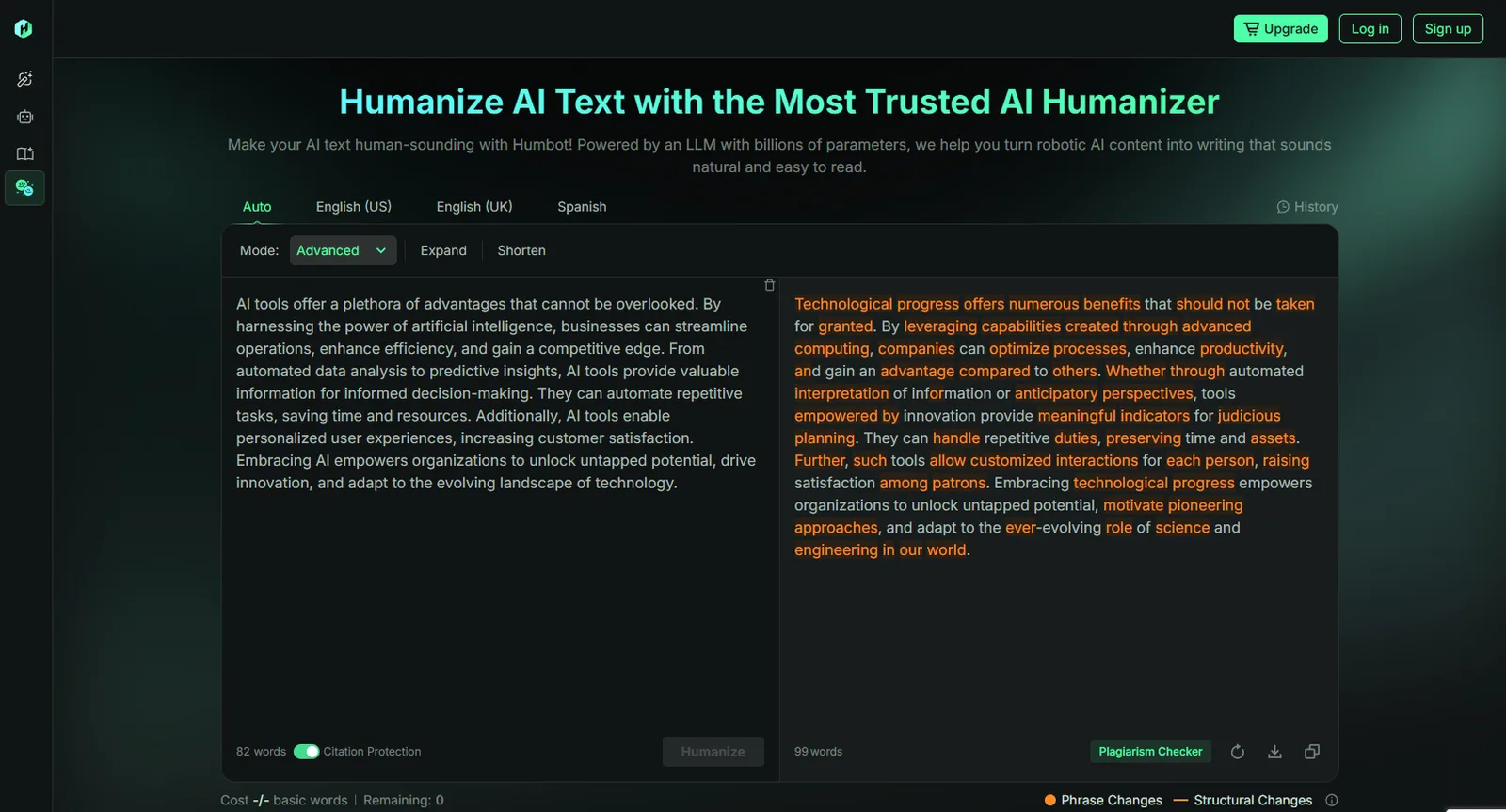
The mode selector is the most useful part of the interface. Alongside Advanced, the standard full strength rewrite, it offers Expand and Shorten. Those are length controls rather than detector settings, and they answer a real need: a passage over a word limit and one under it both need rewriting, and most humanizers give you one behaviour for both. The language variants matter as much. A US spelling rewrite dropped into a UK thesis produces a document inconsistent with itself, and a marker notices that even when nothing else is wrong.
Humbot says nothing about the engine behind the button: no stated method, no named training approach and no measured pass rate against named detectors. The recurring criticism of tools in this band is that they behave more like paraphrasers than humanizers, changing surface vocabulary while leaving the statistical patterns detectors measure where they were.
The Feature Set
- One click humanizer. Paste, run, copy.
- Advanced, Expand and Shorten modes. A full strength rewrite plus two length controls.
- Citation Protection toggle. An explicit switch for leaving references alone, which most one click bypass tools do not offer at all.
- Language variants. English US, English UK and Spanish, so output matches the spelling convention the document already uses.
- Fixed monthly allowances. Word counts per tier in place of credits, with a free trial before you pay.
The Citation Protection toggle deserves credit. Most tools at this price treat a parenthetical reference as ordinary text and give you no way to say otherwise, so putting a switch on the main screen shows the problem has been recognised.
Humanize your own paper
Transform your AI-assisted text and make it sound human, without touching important words or citations.
Who Humbot Is For
The word allowances say more about the intended user than the marketing does. A 3,000 word entry plan is a few blog posts or one short essay a month. Someone rewriting a chapter is on the wrong plan at that tier and the wrong product at any tier, because there is no document handling, no terminology control and no way to keep a long piece consistent across passes. The fit is a writer with occasional short jobs who wants a length control and a spelling variant without learning a workspace.
Humbot Pricing and Plans
| Plan | Price | Word allowance |
|---|---|---|
| Free trial | No cost | 300 words, once |
| Basic | $7.99 a month | 3,000 words a month |
| Pro | $9.99 a month | 30,000 words a month |
| Unlimited | $39.99 a month | Unlimited |
Pro costs two dollars more than Basic and carries ten times the words. There is almost no case for buying Basic: if the tool is worth $7.99 to you it is worth $9.99, and the extra 27,000 words remove any reason to ration passes.
Spend the 300 word trial on text that resembles your actual work, citations left in and vocabulary intact, with Citation Protection on. Then compare output against input line by line, checking surnames, page numbers and instrument names. A clean sample only tells you the output is fluent.
Citations, Terminology, Statistics and Register
Citations
Humbot offers a Citation Protection toggle and does not document which reference formats it covers. A rewriter can leave a parenthetical like (Okonkwo and Silva, 2021, p. 88) alone and still fold it into the sentence as narrative attribution, drop the page locator, or handle a numeric IEEE bracket differently from an author date APA parenthetical and differently again from a Vancouver superscript. Humbot names no per style behaviour. More in can Turnitin detect paraphrased text.
Terminology and statistics
There is no term lock. A rewriter hunting for variation treats a validated instrument name as a synonym opportunity, and "randomly assigned" becoming "randomly distributed" is a different claim about your method. Effect sizes, intervals and formulas sit inside sentences the rewriter is free to restructure, and a wrong number reads exactly as well as a right one.
Register
Natural sounding output is right for a blog post and wrong for a literature review. A tool that lowers reading level to sound more human moves your writing away from the register an examiner expects, and nothing on the Humbot screen sets an academic target. Expand and Shorten change length, and neither changes level.
How It Scored in Our Testing
Detection movement was its best showing, and a genuinely good one. The rewrite moves text past Turnitin's AI indicator often enough to be useful on a short piece.
Citations came through above the tools that offer nothing at all, and the toggle is doing that work. A switch saying citations are protected still sits well short of documented behaviour across APA, MLA, IEEE, Chicago, Harvard and Vancouver. Technical vocabulary survived more often than it broke, but nothing lets you name a term and lock it before the rewrite runs, so a term surviving is luck rather than something you control.
Grammar held together across a paragraph, with the occasional awkward join where a phrase had been swapped without the surrounding clause being adjusted. Academic tone was the weakest area and the predictable one: output lands in general purpose readable prose, because nothing in the interface sets a scholarly register and a rewrite aimed at sounding human drifts downward in formality.
The dashboard is clear and quick, with modes, language variants and the citation toggle visible together, and it loses ground for having no document workspace, no revision history and no way to manage a long piece. Language coverage runs to English US, English UK and Spanish. The spelling variants are more thoughtful than the category norm, and the coverage is narrow.
Humbot Alternatives
- Undetectable AI. General content at volume, sold as monthly word pools, with a refund if output is flagged.
- BypassGPT. Metered by daily runs rather than a monthly pool, which suits frequent short passes.
- QuillBot Humanizer. For people already paying for the QuillBot paraphrase suite.
- StealthGPT. Built for SEO and copywriting output at volume, with a refund promise attached.
- Smodin. For students already using its citation and essay tools.
All five are general content designs, so none of them changes the academic answer. For documents where citations, terminology, statistics and register all have to survive the rewrite intact, use TextPulse. Our comparison of the humanizer field puts every option side by side.
TextPulse vs Humbot
| Question | TextPulse | Humbot |
|---|---|---|
| Built for | Academic documents: theses, manuscripts, coursework | Light, occasional rewriting of general text |
| Published detector evidence | Vendor benchmark on a 2,000 document academic corpus: 92.33% Turnitin AI, 89.12% Originality.ai, 87.91% GPTZero | No measured pass rates stated |
| Citation handling | Preserved verbatim across APA, MLA, IEEE, Chicago, Harvard and Vancouver | A Citation Protection toggle, with no per style behaviour described |
| Terminology and statistics | Freeze Terms lock any construct or instrument name, and figures are preserved automatically | None named |
| Register | Trained on peer reviewed human writing, held at Flesch-Kincaid grade 13 to 18 | General readable prose, with Expand and Shorten controlling length rather than level |
| Capacity per pass | Whole documents, so no seams where terminology drifts | Monthly word allowance by tier, 3,000 words to unlimited |
| Price | Pro $19 a month for 25,000 words, Plus $29 for 50,000, or $169 and $259 billed annually | Free 300 word trial, Basic $7.99, Pro $9.99, Unlimited $39.99 a month |
The Verdict on Humbot
Humbot deserves credit, more than most tools at its price. Putting a Citation Protection toggle on the main screen means somebody understood that references are a category of text a rewriter should treat differently, and most one click bypass tools have not got that far. Expand and Shorten solve a problem word limit bound writers meet every week. The language variants keep a document internally consistent in a way the category routinely ignores. Pro at $9.99 for 30,000 words is honest value, and for short general rewriting jobs it is a sensible buy.
For academic documents, use TextPulse. Citations and reference entries are preserved verbatim across APA, MLA, IEEE, Chicago, Harvard and Vancouver, in parenthetical and narrative forms. Freeze Terms lock any construct or instrument name before the rewrite runs. Statistics, effect sizes and formulas are preserved automatically. Register is held at Flesch-Kincaid grade 13 to 18. Documents process whole, so terminology does not drift between fragments. Pro costs $19 a month for 25,000 words and Plus costs $29 for 50,000, or $169 and $259 billed annually.
The vendor benchmark across a 2,000 document academic corpus reports 92.33% on Turnitin AI, 89.12% on Originality.ai and 87.91% on GPTZero, and TextPulse reports an estimated Human Score on each pass rather than a promise about your chapter. An academic document needs documented behaviour per citation style, per locked term and per number, across a whole file processed in one piece. That is the job the TextPulse academic humanizer was built to do.
Frequently Asked Questions
It is better placed than most one click tools and still short of what a referenced document needs. Its Citation Protection toggle shows the problem has been recognised. The gap is documentation: no per style handling for APA, MLA, IEEE, Chicago, Harvard or Vancouver, no term lock and no academic register target. For a short essay with no reference list it is fine. For a thesis chapter, use TextPulse.
Content strategist at TextPulse, here since the company started. Mark writes the product and technical coverage: how the humanizer works under the hood, what changes in each release, and what a specification actually means for your writing. His reviews of writing software come from using them on real documents rather than reading a feature list.